| Name | Birthdate | Mass_kg | Species | Friendly |
|---|---|---|---|---|
| A nonymouse | 2001-01-01 | 14.5 | NA | FALSE |
| Frank | 2008-09-01 | 4.1 | Cat | TRUE |
| Boojum | 1982-07-11 | 7.2 | Dog | TRUE |
Reading data into R
Andrew Irwin, a.irwin@dal.ca
2026-02-03
Reading data
Most data originates outside of R
-
To use data with R, you must
Obtain a copy of the data in some format
Get R to “read” those data
Check that the data were interpreted correctly
What formats do data come in?
Spreadsheet (Excel, Google Sheets, Numbers, LibreOffice Calc)
Text files (csv, tab separated, delimited)
Binary formats (various)
Self-documenting (NetCDF for geophysical data, specialized for astronomy, oceanography, computer model output)
An almost infinite variety of custom formats
Examples
Create your own excel worksheet
Environment Canada weather: https://climate.weather.gc.ca/climate_data/daily_data_e.html?StationID=50620
CO2: https://www.esrl.noaa.gov/gmd/webdata/ccgg/trends/co2/co2_mm_mlo.txt
Spreadsheet
Comma separated values
Tab separated values
With a header
Clean-up
Another way to convert columns
Warning, hablar has some functions with same names as functions in dplyr. For example, need to use dplyr::na_if to use the masked na_if function.
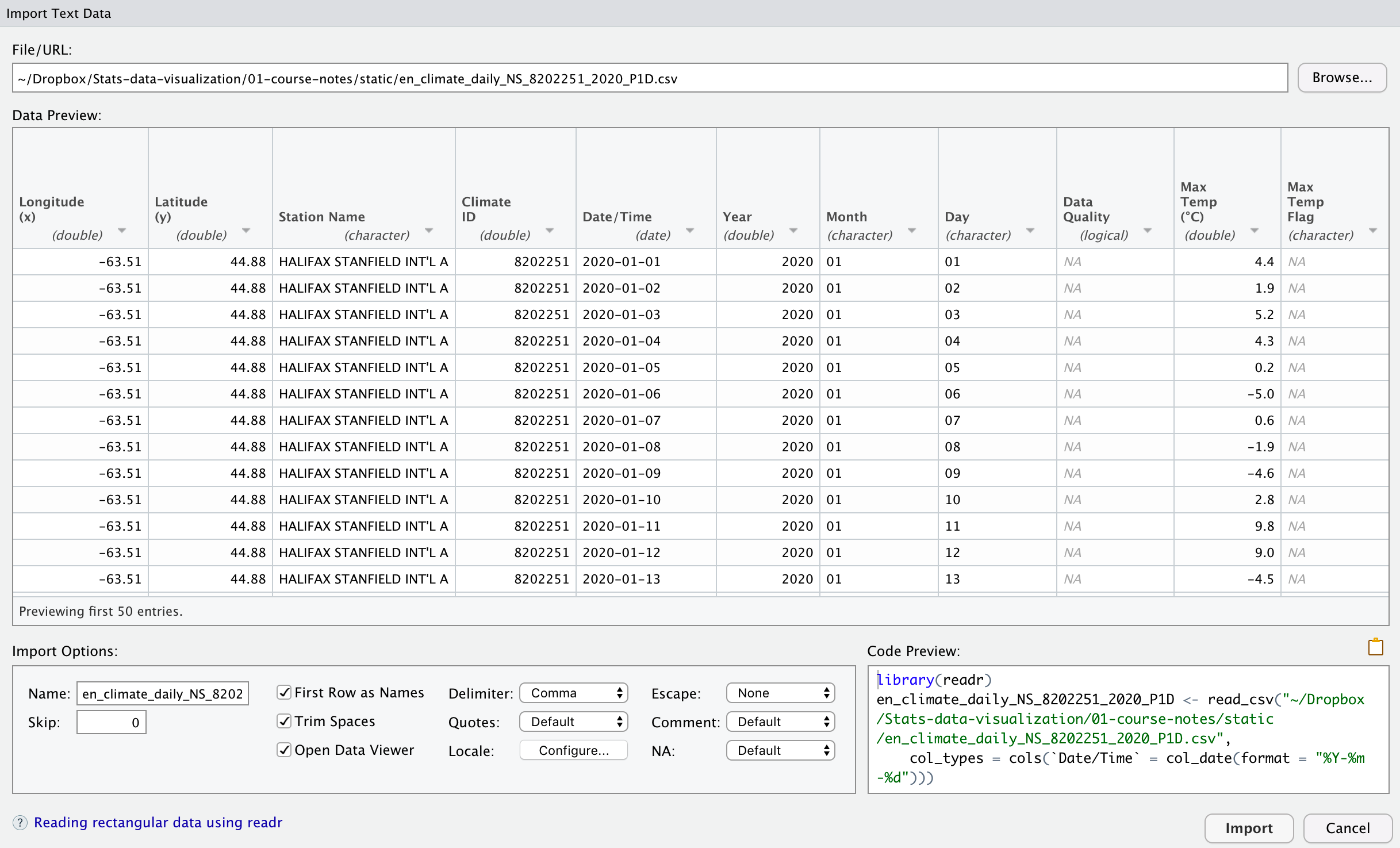
Rstudio data import helper
Flle > Import dataset > From text (readr) …
Cleaning variable names
Variable (column) names that contain spaces, brackets, arithmetic symbols, and other symbols
These variable names must be enclosed in backticks (e.g.,
`Max Temp (°C)`)clean_namesin thejanitorpackage transforms the names to make them easier to type
Original names: Longitude (x), Date/Time, Max Temp (°C)Cleaned names: longitude_x, date_time, max_temp_cThings to watch out for
Multi-row headings, missing headings
Extra rows at the top of the file
Missing data coded in an “interesting” way
Multiple tabs (sheets) in a spreadsheet or workbook
Date formats
Numeric data interpreted as text
Summary
read_excelto read from spreadsheetsread_csv,read_tsv, andread_delimto read many text filesTry the Rstudio data import tool. Notice the R code generated for you.
Always check your data table in R
Lots of ways for errors to arise
Practice and ask for help if you have trouble
Further reading
- Lots more examples with different data in the course notes